A/R Transaction Report
Report Parameters
|
Field |
Description |
|---|---|
|
Report Name |
The name of the report. |
|
From Date |
The start date from when the data must be considered for generating the report. |
|
To Date |
The end date until when the data must be considered for generating the report. |
|
Select Options |
Available options include the following:
|
|
Batch Status |
Available options include the following:
This field is displayed only when By Batch is selected in Select option. |
|
Print by Batch Range |
When enabled, the system prints the records by batch range. This field is displayed only when By Batch is selected in Select option. |
|
Transaction Code |
A drop-down list consisting of all the transaction codes. Users can select multiple or all the transaction codes from the list to be displayed in the report generated. This field is displayed only when either By Transaction Code or By Transaction Code (Summarized) is selected in Select option. |
|
Account Name |
A drop-down list consisting of all the account names. Users can select multiple or all the account names from the list to be displayed in the report generated. This field is displayed only when By Customer Account is selected in Select option |
|
Templates |
A drop-down list consisting of all the template codes. Users can select multiple or all the template codes from the list to be displayed in the report generated. This field is displayed only when By Batch Template is selected in Select option |
|
Account Category |
A drop-down list consisting of all the account categories. Users can select multiple or all the account categories from the list to be displayed in the report generated. This field is displayed only when By Account Category is selected in Select option |
|
Account Code |
A drop-down list consisting of all the account codes. Users can select multiple or all the account codes from the list to be displayed in the report generated. This field is displayed only when By Account Code is selected in Select option |
Sample Report
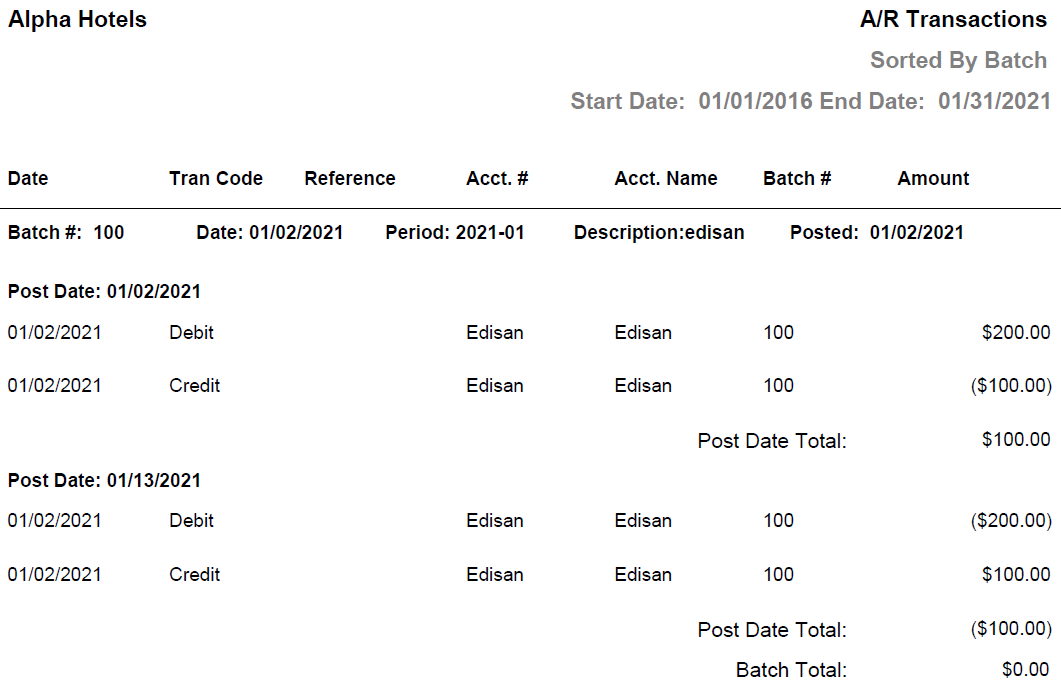
Report Fields
|
Field |
Description |
|---|---|
|
Date |
The date on which the transaction was made. |
|
Tran Code |
The transaction code associated with the transaction. |
|
Reference |
The reference attached to the transaction at the time of batch creation. |
|
Acct. # |
The code of the A/R account. |
|
Acct. Name |
The name of the A/R account. |
|
Batch # |
The batch number of the A/R transaction. |
|
Amount |
The transaction amounts. |
|
Date |
The date the batch was created. |
|
Period |
The accounting period during which the batch was created. |
|
Description |
The description given during batch creation. |
|
Posted |
The date the batch was posted. |
|
Post Date Total |
The total transaction amounts for a date. |
|
Batch Total |
The total transaction amounts for a batch. |